Level of Detail (LOD)
LOD in Action
Animation showing the same node flow at three zoom levels: At 20% zoom (minimal) - nodes appear as simple colored rectangles, connections hidden. At 40% zoom (standard) - node content visible, connections shown without labels. At 80% zoom (full) - all details visible including ports, labels, and resize handles.
The Level of Detail (LOD) system can adjust which visual elements are rendered based on the current zoom level. It can also switch visible nodes from individual widgets to a batched overview painter when their count exceeds the interactive-node budget. This improves performance when viewing large graphs and reduces visual clutter at low zoom levels. Adaptive rendering is opt-in; the default editor keeps the complete node experience at every zoom level.
How LOD Works
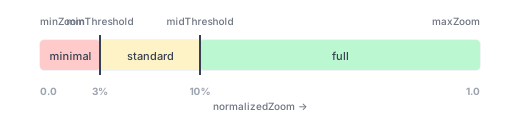
LOD uses normalized zoom (0.0 to 1.0) based on your min/max zoom configuration:
| Zoom Range | Visibility Preset | Elements Visible |
|---|---|---|
| Below 3% | minimal | Node shapes, connection lines only |
| 3% to 10% | standard | Node content, connections (no labels) |
| Above 10% | full | All elements including labels, ports, resize handles |
Quick Start
Default Behavior
LOD is included as a default plugin but is disabled by default. Nodes, ports, labels, connection details, and resize handles therefore remain available at every zoom level:
NodeFlowController(
  config: NodeFlowConfig(
    // Defaults include LodPlugin(enabled: false)
  ),
)
Enable Adaptive LOD
Enable LOD explicitly when a graph benefits more from reduced widget work than from full-detail rendering. It enters adaptive overview mode when the normalized zoom is below minThreshold or more than maxInteractiveNodes nodes intersect the actual viewport. The off-screen culling preload does not count toward this budget, so nearby nodes cannot unexpectedly trigger overview mode while you are zoomed in:
NodeFlowController(
  config: NodeFlowConfig(
    plugins: [
      LodPlugin(enabled: true, maxInteractiveNodes: 200),
      // ... other plugins
    ],
  ),
)
In overview mode, nodes remain selectable, tappable, and draggable through spatial hit-testing. The node currently being dragged or resized is promoted into a real widget above the painted scene, so its content and interaction state remain intact. CommentNode thumbnails also retain their note text. Other node child widgets and ports are not built, so port-based connection editing resumes after zooming in or reducing the on-screen node count. Use NodeFlowEditor.thumbnailBuilder when a custom node needs a content-faithful painted representation.
Connections also switch to an overview render scene: geometry is resolved into immutable snapshots outside paint, routes become straight physical-port paths, endpoints and labels are omitted, and static edges sharing a color and stroke are painted in bounded batches. Selected and animated connections remain independent so their interaction feedback is preserved.
Keep Full Detail Explicitly
The default already keeps every visible node as a full widget. You can state that requirement explicitly in a custom plugin list:
NodeFlowController(
  config: NodeFlowConfig(
    plugins: [
      LodPlugin(enabled: false),
      // ... other plugins
    ],
  ),
)
Custom Thresholds
Adjust when elements appear/disappear:
NodeFlowController(
  config: NodeFlowConfig(
    plugins: [
      LodPlugin(
        minThreshold: 0.2,   // Minimal below 20%
        midThreshold: 0.5,   // Standard 20-50%, Full above 50%
        maxInteractiveNodes: 300,
      ),
      // ... other plugins
    ],
  ),
)
Visibility Presets
LOD includes three built-in visibility presets that control which elements are rendered:
DetailVisibility.minimal
For extreme zoom-out views where detail isn't visible anyway:
const DetailVisibility.minimal = DetailVisibility(
  showNodeContent: false,
  showPorts: false,
  showPortLabels: false,
  showConnectionLines: true,   // Still visible for structure
  showConnectionLabels: false,
  showConnectionEndpoints: false,
  showResizeHandles: false,
);
DetailVisibility.standard
For medium zoom levels where structure is visible:
const DetailVisibility.standard = DetailVisibility(
  showNodeContent: true,       // Show node widgets
  showPorts: false,
  showPortLabels: false,
  showConnectionLines: true,
  showConnectionLabels: false,
  showConnectionEndpoints: false,
  showResizeHandles: false,
);
DetailVisibility.full
For close-up views where all interaction is possible:
const DetailVisibility.full = DetailVisibility(
  showNodeContent: true,
  showPorts: true,
  showPortLabels: true,
  showConnectionLines: true,
  showConnectionLabels: true,
  showConnectionEndpoints: true,
  showResizeHandles: true,
);
Custom Visibility Configuration
Create your own visibility presets for specific needs:
// Custom preset: show connections but hide node content
const connectionsOnly = DetailVisibility(
  showNodeContent: false,
  showPorts: true,
  showPortLabels: false,
  showConnectionLines: true,
  showConnectionLabels: true,
  showConnectionEndpoints: true,
  showResizeHandles: false,
);

// Use in LodPlugin
NodeFlowController(
  config: NodeFlowConfig(
    plugins: [
      LodPlugin(
        enabled: true,
        minThreshold: 0.25,
        midThreshold: 0.60,
        minVisibility: DetailVisibility.minimal,
        midVisibility: connectionsOnly, // Custom preset
        maxVisibility: DetailVisibility.full,
      ),
      // ... other plugins
    ],
  ),
)
Visibility Properties
| Property | Description |
|---|---|
showNodeContent | Render custom widgets inside nodes |
showPorts | Show port shapes on nodes |
showPortLabels | Show labels next to ports |
showConnectionLines | Render connection paths between nodes |
showConnectionLabels | Show labels on connections |
showConnectionEndpoints | Show decorative markers at connection ends |
showResizeHandles | Show resize handles on selected resizable nodes |
Accessing LOD State
The LOD state is reactive and can be accessed through the controller's lod plugin:
// Get current normalized zoom (0.0 to 1.0)
final zoom = controller.lod?.normalizedZoom;

// Get current visibility settings
final visibility = controller.lod?.currentVisibility;

// Check individual visibility flags
if (controller.lod?.showPorts ?? false) {
  // Ports are visible at current zoom
}

if (controller.lod?.showConnectionLabels ?? false) {
  // Connection labels are visible
}
Reactive Updates
LOD state updates automatically with MobX when zoom changes:
import 'package:flutter_mobx/flutter_mobx.dart';

class ZoomAwareWidget extends StatelessWidget {
  final NodeFlowController controller;

  @override
  Widget build(BuildContext context) {
    return Observer(
      builder: (_) {
        final lod = controller.lod;
        if (lod == null) return const SizedBox.shrink();

        final visibility = lod.currentVisibility;

        return Column(
          children: [
            Text('Zoom: ${(lod.normalizedZoom * 100).toStringAsFixed(0)}%'),
            Text('Showing ports: ${visibility.showPorts}'),
            Text('Showing labels: ${visibility.showPortLabels}'),
          ],
        );
      },
    );
  }
}
Runtime Configuration
Change LOD settings at runtime via the lod plugin methods:
// Update individual thresholds
controller.lod?.setThresholds(
  minThreshold: 0.3,
  midThreshold: 0.7,
);

// Update the visible-node budget for full widget rendering
controller.lod?.setMaxInteractiveNodes(300);

// Update visibility presets
controller.lod?.setMinVisibility(DetailVisibility.minimal);
controller.lod?.setMidVisibility(DetailVisibility.standard);
controller.lod?.setMaxVisibility(DetailVisibility.full);

// Enable/disable LOD
controller.lod?.enable();
controller.lod?.disable();
controller.lod?.toggle();
Performance Benefits
LOD reduces work on both the widget and connection paths:
- Batched node rendering: Overview nodes use one thumbnail painter per populated z-layer instead of building hundreds of child widgets.
- Simplified connection geometry: Overview edges skip routers, path-cache lookups, endpoints, and labels.
- Batched static edges: Connections with the same resolved color and stroke are grouped into bounded paths while selected and animated edges remain isolated. Bounded batches avoid a single graph-spanning path becoming a rasterization bottleneck.
- Smaller reactive surface: Live camera frames do not invalidate committed graph state, and visibility queries are coalesced behind a query margin.
- Idle layer elision: Empty node layers and inactive interaction overlays do not create full-canvas painters, repaint boundaries, or transform listeners.
Measure your own node builders, graph density, display, and Flutter target with the reproducible 500-node profile harness in packages/demo/integration_test/node_flow_500_benchmark_test.dart. It reports UI/raster/total p50, p95, p99, maximum frame time, and 60 FPS budget misses for both full and adaptive rendering; the documentation intentionally does not promise hardware-independent frame times.
Best Practices
- Tune thresholds for your use case: Large complex nodes may need higher thresholds
- Test at various zoom levels: Ensure transitions feel natural
- Consider connection density: Dense graphs benefit more from hiding connection labels early
- Keep the default for demos: The disabled default always shows full detail
- Custom presets for specific views: Create visibility presets that make sense for your domain
Common Patterns
Presentation Mode
LOD is disabled by default. Presentation mode can restore that state after a user has opted into adaptive rendering:
void enterPresentationMode() {
  controller.lod?.disable();
}

void exitPresentationMode() {
  controller.lod?.enable();
}
User Preference Toggle
Let users control LOD behavior:
class FlowEditorSettings extends StatelessWidget {
  final NodeFlowController controller;

  @override
  Widget build(BuildContext context) {
    return Observer(
      builder: (_) {
        final isLODEnabled = controller.lod?.isEnabled ?? false;

        return SwitchListTile(
          title: const Text('Auto-hide details when zoomed out'),
          value: isLODEnabled,
          onChanged: (enabled) {
            if (enabled) {
              controller.lod?.enable();
            } else {
              controller.lod?.disable();
            }
          },
        );
      },
    );
  }
}
Debug Overlay
Show current LOD state for debugging:
Widget buildDebugOverlay(NodeFlowController controller) {
  return Observer(
    builder: (_) {
      final lod = controller.lod;
      if (lod == null) return const SizedBox.shrink();

      return Container(
        padding: const EdgeInsets.all(8),
        color: Colors.black54,
        child: Column(
          crossAxisAlignment: CrossAxisAlignment.start,
          children: [
            Text('Zoom: ${(lod.normalizedZoom * 100).toStringAsFixed(1)}%'),
            Text('Content: ${lod.showNodeContent}'),
            Text('Ports: ${lod.showPorts}'),
            Text('Labels: ${lod.showPortLabels}'),
            Text('Connections: ${lod.showConnectionLines}'),
          ],
        ),
      );
    },
  );
}
API
LodPlugin Constructor
| Parameter | Type | Default | Description |
|---|---|---|---|
enabled | bool | false | Whether LOD is enabled |
minThreshold | double | 0.03 | Normalized zoom for minimal detail |
midThreshold | double | 0.10 | Normalized zoom for standard detail |
minVisibility | DetailVisibility | DetailVisibility.minimal | Visibility below minThreshold |
midVisibility | DetailVisibility | DetailVisibility.standard | Visibility between thresholds |
maxVisibility | DetailVisibility | DetailVisibility.full | Visibility above midThreshold |
LodPlugin Properties (accessed via controller.lod)
| Property | Type | Description |
|---|---|---|
isEnabled | bool | Whether LOD is currently enabled |
minThreshold | double | Threshold for minimal visibility |
midThreshold | double | Threshold for standard visibility |
minVisibility | DetailVisibility | Visibility preset for minimal detail |
midVisibility | DetailVisibility | Visibility preset for standard detail |
maxVisibility | DetailVisibility | Visibility preset for full detail |
normalizedZoom | double | Current zoom normalized to 0.0-1.0 |
currentVisibility | DetailVisibility | Current visibility settings |
showNodeContent | bool | Whether node content is visible |
showPorts | bool | Whether ports are visible |
showPortLabels | bool | Whether port labels are visible |
showConnectionLines | bool | Whether connection lines are visible |
showConnectionLabels | bool | Whether connection labels are visible |
showConnectionEndpoints | bool | Whether endpoints are visible |
showResizeHandles | bool | Whether resize handles are visible |
LodPlugin Methods
| Method | Description |
|---|---|
enable() | Enables LOD visibility adjustments |
disable() | Disables LOD (always shows full detail) |
toggle() | Toggles between enabled and disabled |
setThresholds({minThreshold, midThreshold}) | Updates zoom thresholds |
setMinThreshold(double) | Sets the minimal visibility threshold |
setMidThreshold(double) | Sets the standard visibility threshold |
setMinVisibility(DetailVisibility) | Sets visibility preset for minimal detail |
setMidVisibility(DetailVisibility) | Sets visibility preset for standard detail |
setMaxVisibility(DetailVisibility) | Sets visibility preset for full detail |
See Also
- Configuration - General configuration options
- Theming Overview - Visual customization
- Port Labels - How LOD affects port labels