
Level of Detail (LOD)
LOD in Action
Animation showing the same node flow at three zoom levels: At 20% zoom (minimal) - nodes appear as simple colored rectangles, connections hidden. At 40% zoom (standard) - node content visible, connections shown without labels. At 80% zoom (full) - all details visible including ports, labels, and resize handles.
The Level of Detail (LOD) system automatically adjusts which visual elements are rendered based on the current zoom level. This improves performance when viewing large graphs and reduces visual clutter at low zoom levels.
How LOD Works
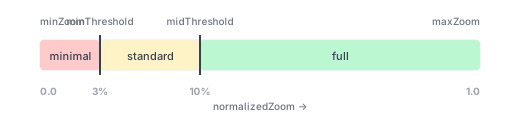
LOD uses normalized zoom (0.0 to 1.0) based on your min/max zoom configuration:
| Zoom Range | Visibility Preset | Elements Visible |
|---|---|---|
| Below 3% | minimal | Node shapes, connection lines only |
| 3% to 10% | standard | Node content, connections (no labels) |
| Above 10% | full | All elements including labels, ports, resize handles |
Quick Start
Default Behavior
LOD is included as a default extension but is disabled by default (always shows full detail):
NodeFlowController(
  config: NodeFlowConfig(
    // Default extensions include LodExtension() which is disabled
  ),
)
Enable LOD
Enable LOD to auto-hide details when zoomed out:
NodeFlowController(
  config: NodeFlowConfig(
    extensions: [
      LodExtension(enabled: true),
      // ... other extensions
    ],
  ),
)
Custom Thresholds
Adjust when elements appear/disappear:
NodeFlowController(
  config: NodeFlowConfig(
    extensions: [
      LodExtension(
        enabled: true,
        minThreshold: 0.2,   // Minimal below 20%
        midThreshold: 0.5,   // Standard 20-50%, Full above 50%
      ),
      // ... other extensions
    ],
  ),
)
Visibility Presets
LOD includes three built-in visibility presets that control which elements are rendered:
DetailVisibility.minimal
For extreme zoom-out views where detail isn't visible anyway:
const DetailVisibility.minimal = DetailVisibility(
  showNodeContent: false,
  showPorts: false,
  showPortLabels: false,
  showConnectionLines: true,   // Still visible for structure
  showConnectionLabels: false,
  showConnectionEndpoints: false,
  showResizeHandles: false,
);
DetailVisibility.standard
For medium zoom levels where structure is visible:
const DetailVisibility.standard = DetailVisibility(
  showNodeContent: true,       // Show node widgets
  showPorts: false,
  showPortLabels: false,
  showConnectionLines: true,
  showConnectionLabels: false,
  showConnectionEndpoints: false,
  showResizeHandles: false,
);
DetailVisibility.full
For close-up views where all interaction is possible:
const DetailVisibility.full = DetailVisibility(
  showNodeContent: true,
  showPorts: true,
  showPortLabels: true,
  showConnectionLines: true,
  showConnectionLabels: true,
  showConnectionEndpoints: true,
  showResizeHandles: true,
);
Custom Visibility Configuration
Create your own visibility presets for specific needs:
// Custom preset: show connections but hide node content
const connectionsOnly = DetailVisibility(
  showNodeContent: false,
  showPorts: true,
  showPortLabels: false,
  showConnectionLines: true,
  showConnectionLabels: true,
  showConnectionEndpoints: true,
  showResizeHandles: false,
);

// Use in LodExtension
NodeFlowController(
  config: NodeFlowConfig(
    extensions: [
      LodExtension(
        enabled: true,
        minThreshold: 0.25,
        midThreshold: 0.60,
        minVisibility: DetailVisibility.minimal,
        midVisibility: connectionsOnly, // Custom preset
        maxVisibility: DetailVisibility.full,
      ),
      // ... other extensions
    ],
  ),
)
Visibility Properties
| Property | Description |
|---|---|
showNodeContent | Render custom widgets inside nodes |
showPorts | Show port shapes on nodes |
showPortLabels | Show labels next to ports |
showConnectionLines | Render connection paths between nodes |
showConnectionLabels | Show labels on connections |
showConnectionEndpoints | Show decorative markers at connection ends |
showResizeHandles | Show resize handles on selected resizable nodes |
Accessing LOD State
The LOD state is reactive and can be accessed through the controller's lod extension:
// Get current normalized zoom (0.0 to 1.0)
final zoom = controller.lod?.normalizedZoom;

// Get current visibility settings
final visibility = controller.lod?.currentVisibility;

// Check individual visibility flags
if (controller.lod?.showPorts ?? false) {
  // Ports are visible at current zoom
}

if (controller.lod?.showConnectionLabels ?? false) {
  // Connection labels are visible
}
Reactive Updates
LOD state updates automatically with MobX when zoom changes:
import 'package:flutter_mobx/flutter_mobx.dart';

class ZoomAwareWidget extends StatelessWidget {
  final NodeFlowController controller;

  @override
  Widget build(BuildContext context) {
    return Observer(
      builder: (_) {
        final lod = controller.lod;
        if (lod == null) return const SizedBox.shrink();

        final visibility = lod.currentVisibility;

        return Column(
          children: [
            Text('Zoom: ${(lod.normalizedZoom * 100).toStringAsFixed(0)}%'),
            Text('Showing ports: ${visibility.showPorts}'),
            Text('Showing labels: ${visibility.showPortLabels}'),
          ],
        );
      },
    );
  }
}
Runtime Configuration
Change LOD settings at runtime via the lod extension methods:
// Update individual thresholds
controller.lod?.setThresholds(
  minThreshold: 0.3,
  midThreshold: 0.7,
);

// Update visibility presets
controller.lod?.setMinVisibility(DetailVisibility.minimal);
controller.lod?.setMidVisibility(DetailVisibility.standard);
controller.lod?.setMaxVisibility(DetailVisibility.full);

// Enable/disable LOD
controller.lod?.enable();
controller.lod?.disable();
controller.lod?.toggle();
Performance Benefits
LOD provides significant performance improvements for large graphs:
| Graph Size | Without LOD | With LOD (zoomed out) |
|---|---|---|
| 100 nodes | ~16ms/frame | ~8ms/frame |
| 500 nodes | ~40ms/frame | ~15ms/frame |
| 1000 nodes | ~80ms/frame | ~25ms/frame |
The improvements come from:
- Skipping widget builds: When
showNodeContent: false, complex node widgets aren't built - Skipping path calculations: Hidden connection lines don't compute paths
- Reduced paint operations: Fewer visual elements means faster painting
- Lower memory usage: Fewer widgets in the tree
Best Practices
- Tune thresholds for your use case: Large complex nodes may need higher thresholds
- Test at various zoom levels: Ensure transitions feel natural
- Consider connection density: Dense graphs benefit more from hiding connection labels early
- Use disabled for demos: When showcasing, disable LOD to always show full detail
- Custom presets for specific views: Create visibility presets that make sense for your domain
Common Patterns
Presentation Mode
Disable LOD when presenting to always show full detail:
void enterPresentationMode() {
  controller.lod?.disable();
}

void exitPresentationMode() {
  controller.lod?.enable();
}
User Preference Toggle
Let users control LOD behavior:
class FlowEditorSettings extends StatelessWidget {
  final NodeFlowController controller;

  @override
  Widget build(BuildContext context) {
    return Observer(
      builder: (_) {
        final isLODEnabled = controller.lod?.isEnabled ?? false;

        return SwitchListTile(
          title: const Text('Auto-hide details when zoomed out'),
          value: isLODEnabled,
          onChanged: (enabled) {
            if (enabled) {
              controller.lod?.enable();
            } else {
              controller.lod?.disable();
            }
          },
        );
      },
    );
  }
}
Debug Overlay
Show current LOD state for debugging:
Widget buildDebugOverlay(NodeFlowController controller) {
  return Observer(
    builder: (_) {
      final lod = controller.lod;
      if (lod == null) return const SizedBox.shrink();

      return Container(
        padding: const EdgeInsets.all(8),
        color: Colors.black54,
        child: Column(
          crossAxisAlignment: CrossAxisAlignment.start,
          children: [
            Text('Zoom: ${(lod.normalizedZoom * 100).toStringAsFixed(1)}%'),
            Text('Content: ${lod.showNodeContent}'),
            Text('Ports: ${lod.showPorts}'),
            Text('Labels: ${lod.showPortLabels}'),
            Text('Connections: ${lod.showConnectionLines}'),
          ],
        ),
      );
    },
  );
}
API
LodExtension Constructor
| Parameter | Type | Default | Description |
|---|---|---|---|
enabled | bool | false | Whether LOD is enabled |
minThreshold | double | 0.03 | Normalized zoom for minimal detail |
midThreshold | double | 0.10 | Normalized zoom for standard detail |
minVisibility | DetailVisibility | DetailVisibility.minimal | Visibility below minThreshold |
midVisibility | DetailVisibility | DetailVisibility.standard | Visibility between thresholds |
maxVisibility | DetailVisibility | DetailVisibility.full | Visibility above midThreshold |
LodExtension Properties (accessed via controller.lod)
| Property | Type | Description |
|---|---|---|
isEnabled | bool | Whether LOD is currently enabled |
minThreshold | double | Threshold for minimal visibility |
midThreshold | double | Threshold for standard visibility |
minVisibility | DetailVisibility | Visibility preset for minimal detail |
midVisibility | DetailVisibility | Visibility preset for standard detail |
maxVisibility | DetailVisibility | Visibility preset for full detail |
normalizedZoom | double | Current zoom normalized to 0.0-1.0 |
currentVisibility | DetailVisibility | Current visibility settings |
showNodeContent | bool | Whether node content is visible |
showPorts | bool | Whether ports are visible |
showPortLabels | bool | Whether port labels are visible |
showConnectionLines | bool | Whether connection lines are visible |
showConnectionLabels | bool | Whether connection labels are visible |
showConnectionEndpoints | bool | Whether endpoints are visible |
showResizeHandles | bool | Whether resize handles are visible |
LodExtension Methods
| Method | Description |
|---|---|
enable() | Enables LOD visibility adjustments |
disable() | Disables LOD (always shows full detail) |
toggle() | Toggles between enabled and disabled |
setThresholds({minThreshold, midThreshold}) | Updates zoom thresholds |
setMinThreshold(double) | Sets the minimal visibility threshold |
setMidThreshold(double) | Sets the standard visibility threshold |
setMinVisibility(DetailVisibility) | Sets visibility preset for minimal detail |
setMidVisibility(DetailVisibility) | Sets visibility preset for standard detail |
setMaxVisibility(DetailVisibility) | Sets visibility preset for full detail |
See Also
- Configuration - General configuration options
- Theming Overview - Visual customization
- Port Labels - How LOD affects port labels